

We’re excited to announce the release of Liana v16, one of our most packed releases so far. Liana now speaks more languages, the UI rework that started in v14 reaches its conclusion, and coins, transactions and payments inherit labels from related items. Encrypted descriptor backups now follow the BIP138 standard, taproot is the default for new wallets, and a security fix protects users who connect to Electrum servers they don’t control.
Before diving in, one thing to know: v16 migrates your wallet database, so wallets opened with v16 can no longer be opened with v15 or below. More details in the last section.
🌍 Liana Speaks Your Language
Liana now supports French, Italian, Brazilian Portuguese and European Portuguese, with a language picker available both in the launcher and in the settings. Self-custody should not require reading English, especially when the stakes are your own coins, and this is a first step toward making Liana accessible to more people around the world.
More languages are on the way. If you speak one that is not on the list, or you would like to review the existing translations, your contribution is more than welcome: reach out to us on Telegram or Discord.
🎨 The UI Rework Reaches Its Conclusion
With v16, the UI rework that started in v14 covers the rest of the app. The Drafts & approvals, Transactions, Coins/UTXOs, Recovery and Settings pages have been reworked, along with the Self-transfer, Payment details and Transaction details panels, all built around new foldable cards, list entries and label components. The installer template diagrams and the coin selection section of the Send screen have been refreshed as well.
Here are a few examples of how it looks now. We won’t show everything: the best way to appreciate the new interface is to download Liana and explore it yourself.
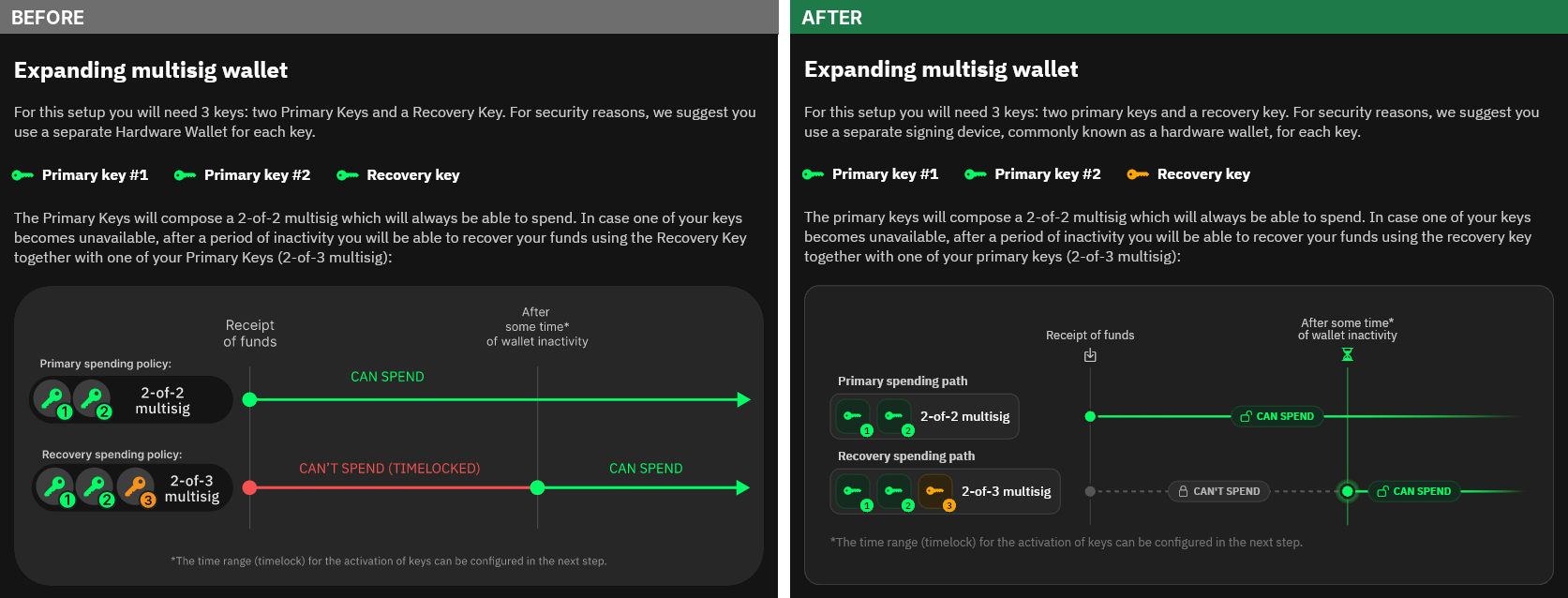
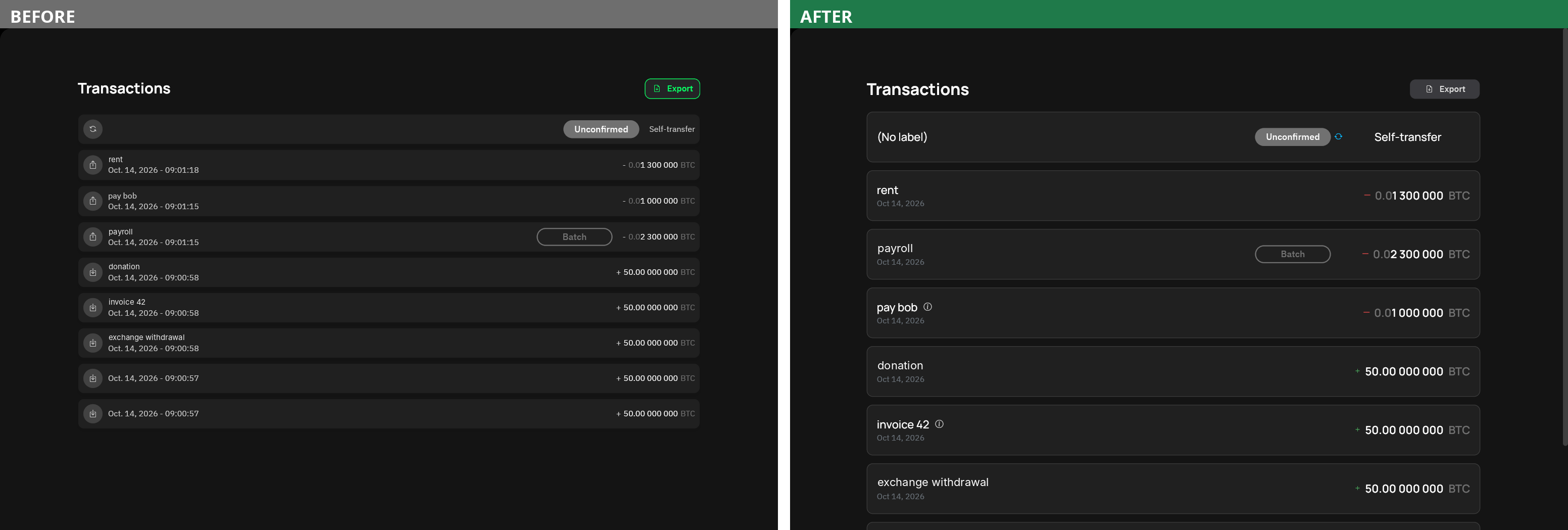
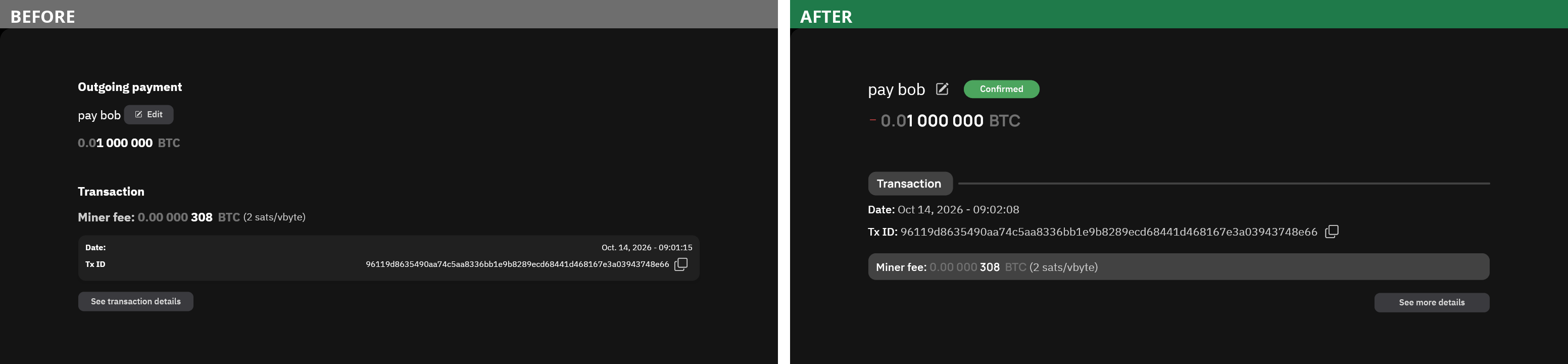
🏷️ Default Labels
Coins, transactions and payments without a label of their own now show the label of a related item, with an info tooltip that tells you where the label comes from, so you always know what is inherited and what you set yourself.
Two cases show why this is useful. The first is the address label: when you label a receiving address, the coin, the payment and the transaction that follow now carry that label too, without extra work. The second is coin refresh: when you refresh a coin to restart its timelock, the new coin inherits the label of the old one, so you can keep track of which payment it was originally related to.

Knowing where each coin comes from is also good for privacy, since it helps you decide which coins to spend together and which to keep apart. The full logic is described in the documentation.
🔐 Encrypted Backups, Now Compatible with BIP138
In v13 we introduced encrypted descriptor backups, based on a proposal that grew out of a discussion on Delving Bitcoin and was turned into a BIP by our own developer @pythcoiner. We are happy to say that BIP138 and BIP139 have finally landed in the BIPs repository, and with v16 the backups Liana produces follow the standardised format, saved as a .bip138 file instead of a .bed file. This matters for interoperability: a standard format means your backup is not tied to a single wallet.
The new version also adds a privacy mode, which lets you choose whether the derivation paths of your keys are included in the backup. Leaving them out reveals less about your wallet, but it comes at the cost of speed: when you decrypt the backup, the signing device has to check the most commonly used derivation paths one by one, and Liana now also offers the other, less common ones as an option.
Backward compatibility is preserved: both the .bed and .json backup files produced by previous versions can still be decrypted/uploaded, so nothing you have already saved becomes useless.
🌿 Taproot by Default
New wallets created with the installer now use taproot by default, so you no longer need to remember to select it. We think it is the right default for two reasons. The first is privacy: when you spend through taproot, only the spending path you used is revealed, so the other paths, such as your recovery paths, stay hidden. The second is fees, for the same reason: since the unused paths are not published on-chain, transactions are smaller and cheaper.
The address type menu offers “Taproot (recommended)” and “Segwit”, replacing the previous “Advanced settings” and “P2WSH” labels, which were harder to understand for anyone not already familiar with the details. Liana still tells you when a signing device doesn’t support taproot, so that you can change it or switch to segwit. It now also warns you when you import an xpub from a file or paste it, since we can’t know in advance which device it will be used with.
🛡️ Security: Protection Against Malicious Electrum Servers
This release fixes a vulnerability affecting the replace-by-fee (RBF) flow when Liana is connected to a malicious Electrum server. Thank you to 5t34k who responsibly disclosed this attack, that we classified as a Medium vulnerability.
A malicious server could acknowledge a transaction broadcast without relaying it, then serve a conflicting transaction spending the same coins to an address of the attacker. Liana would record it as the spend of your coins, and if you then tried to bump its fee or cancel it, you would be handed a replacement paying the attacker, ready to be signed. Such an attack only succeeds if the address you are sending to is not double checked when replacing the transaction.
Liana now verifies that a transaction really spends your coins, with valid signatures, before building any replacement. If it cannot, replacing it is refused. In the interface, the “Bump fee” and “Cancel transaction” buttons are disabled with an explanation of the reason, so you are never handed a transaction that pays the wrong party. We also added a warning in the installer when you enter the IP address of a node, since connecting to a server you don’t control means trusting it.
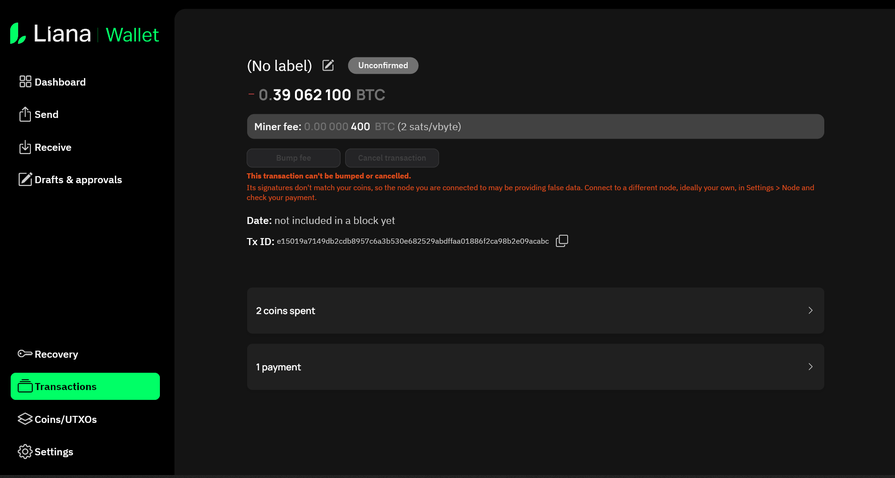
These fixes add a layer of protection, but we want to repeat the two best defenses against this kind of attack, which we have always recommended: use your own node rather than a third party’s, and always check the address on your signing device before signing.
🔧 Other Notable Improvements
- Automatic upgrade of the managed Bitcoin Core. The Bitcoin Core node managed by Liana is now upgraded automatically to version 31.1 when you open a wallet. You can skip the upgrade if you prefer.
- Spend status of PSBTs. The status of your PSBTs is now displayed, with a toggle to hide the confirmed ones.
- Recovery warnings. Liana now warns you if a recovery transaction sends funds to an address of the same wallet. Recovery transactions are normally used when the primary path is no longer available, so sending the funds back to the same wallet would leave them locked under the same conditions. Many thanks to external contributor qlrd for this improvement.
- macOS packaging. The macOS application is now distributed as a
.dmginstead of a.zip. - Fixes. Among others, importing a descriptor or a backup now checks that it matches the network of your wallet, importing a pasted descriptor reminds you that a rescan may be needed, importing test network backups works again, bitcoind wallet paths containing spaces are now handled correctly, and navigation without a mouse in the key import flow has been improved.
See here for the full list of changes included in Liana 16.0.
Before You Upgrade
Running Liana v16 on an existing installation migrates its database. Once migrated, the database is not compatible with previous versions, which means a wallet opened or created with v16 can’t be opened with v15 or below. If you manage the same wallet on several machines, upgrade them all.
🚀 Get Started with Liana 16.0
Liana Wallet v16 is now available for download.
We’d love for you to try the new features, especially the language support and the default labels, and tell us what you think. Your feedback shapes what we build next.
💬 Join the conversation:
- Telegram and Discord to chat directly with the team and community
- X (Twitter) and LinkedIn for announcements and updates
👉 Download Liana Wallet v16 and take control of your bitcoin, securely, privately, and with confidence.