
You know the famous Bitcoin adage: “Don’t Trust Verify”. We readily apply it to the blockchain, but far more rarely to software. Almost nobody compiles their wallet from source. We download unreadable binaries directly and, at best, the most careful users check the file’s hash and the developer’s PGP signature. But a signature proves who publishes the binary, not what it contains. With software that touches your bitcoins, a single tampered binary can be enough to cost you everything.
Note: Liana’s threat model already assumes that the computer running it may be compromised. That is why Wizardsardine recommends using Liana with hardware wallets.
In this article, I explain how reproducible builds close that gap, how GNU Guix and Nix work, and how to verify the Bitcoin Core and Liana binaries yourself.
TL;DR
- You run binaries, not source code: without reproducible builds, nothing proves that the 2 match.
- Reproducible builds let anyone rebuild a release and compare the fingerprints.
- Guix and Nix bootstrap their entire toolchain from a few hundred auditable bytes.
- Bitcoin Core releases are built with Guix and publicly attested by independent builders.
- bitcoind-gunix now reproduces the v31.1 release bit for bit with Nix.
- Liana is reproducible on all 3 operating systems: Guix (bootstrappable) for Linux, Nix for cross-compiling to Windows and macOS.
- If you want to be completely sure about what you’re executing, reproduce the build yourself. It takes a little bit of time, but you’ll be truly honoring “Don’t trust, verify”.
You run binaries, not source code
Software like Bitcoin Core or Liana is first written by developers as source code. Your computer cannot run that source code directly, so it needs a version translated into instructions its processor understands. That translated version is what we call a “binary”, and it is the one you actually launch on your machine.
Those instructions are not the same on every processor. The Intel and AMD chips in most PCs and Intel Macs use the x86_64 instruction set, while Apple Silicon Macs use ARM64, and neither can execute the other’s instructions by itself. The operating system matters too, since a Windows program does not run on macOS. Each binary is therefore built for one precise target, a processor and an operating system. That is why Bitcoin Core builds each release for 8 targets, and why Liana’s macOS app packs both an x86_64 and an ARM64 version into a single file.
The file you download is often not the binary itself but its packaging: a .zip or .tar.gz archive, a .deb package or a Windows installer, whose only job is to deliver the binary and put it in place on your system.
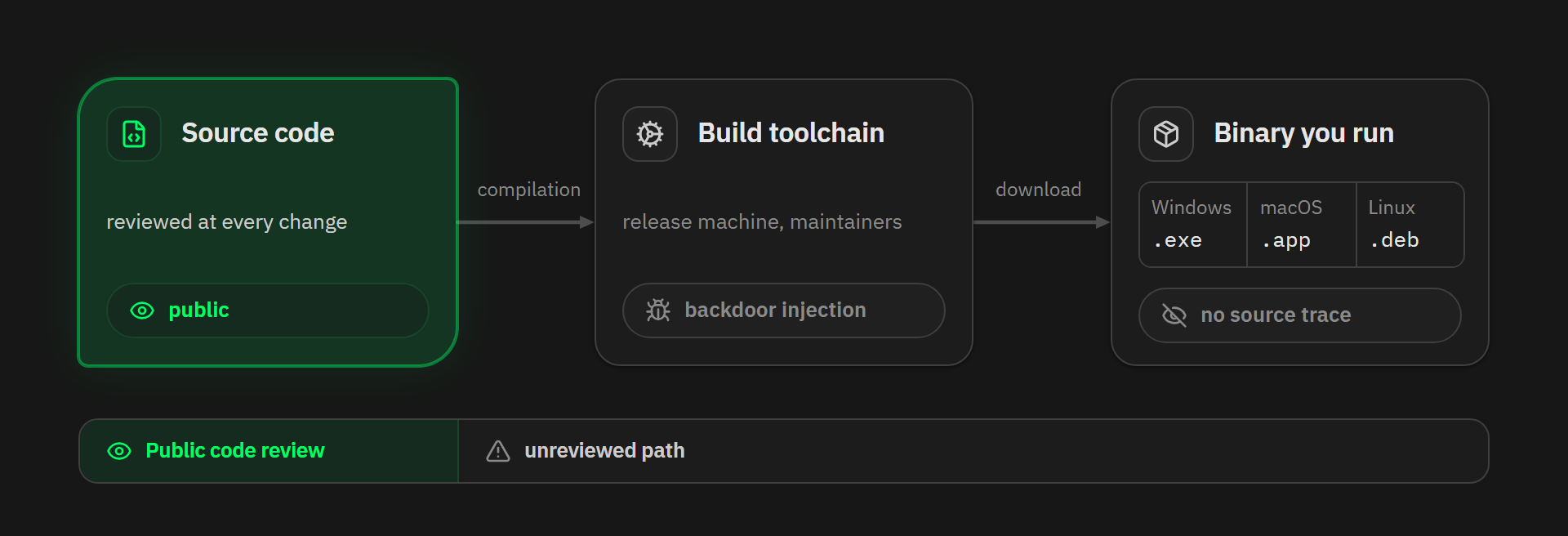
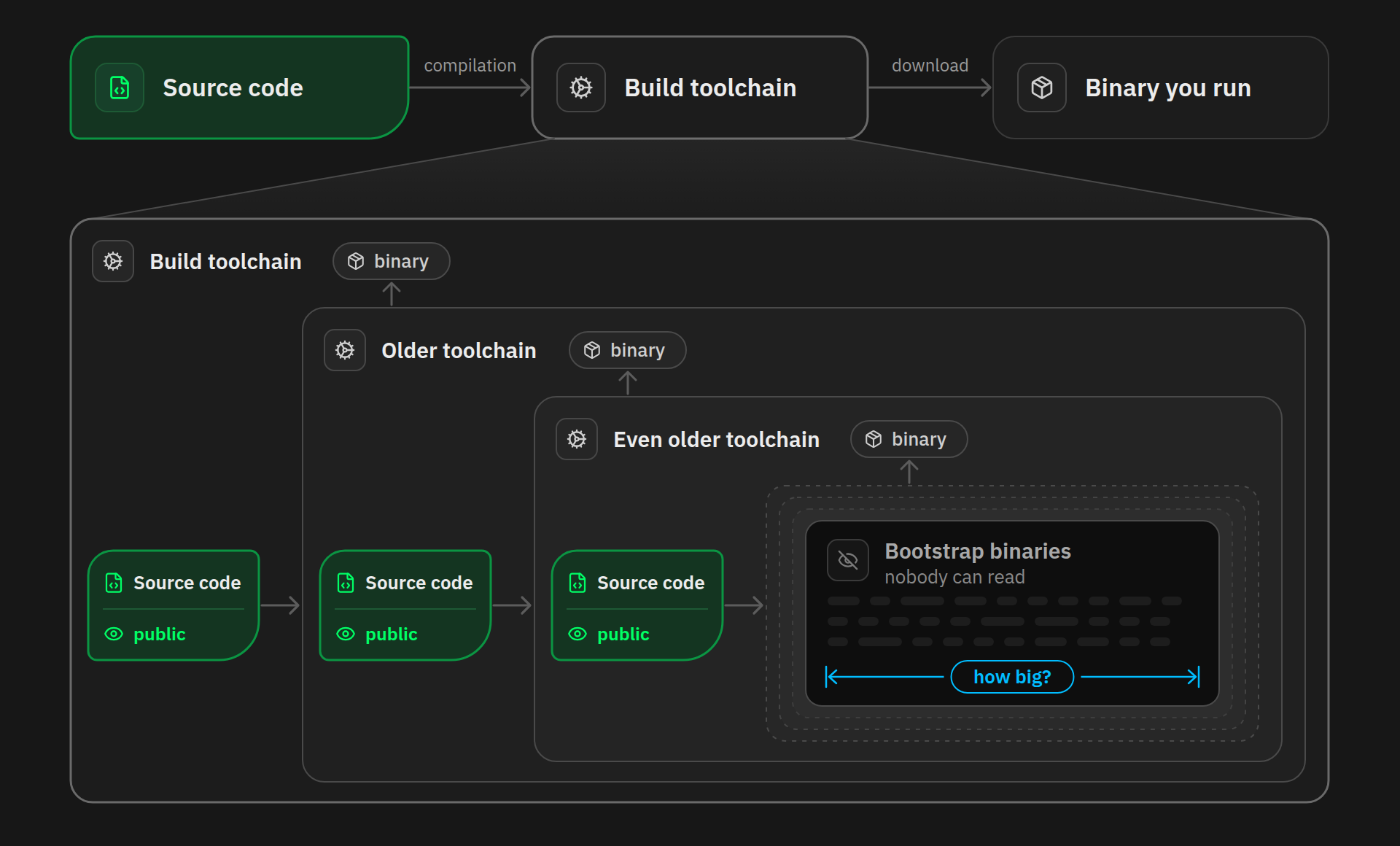
Going from source code to a binary is the build step. Source code goes into a build toolchain, and the binary your machine will run comes out.
Reviewing the open source code therefore only covers the first step. Bitcoin Core’s source code is public and scrutinized at every change, and so is Liana’s. But between the code you see on GitHub and the file you click to open the finished software sits an entire build process, and every link in that chain can be attacked. If the machine that produces the releases is compromised, or if a maintainer turns malicious, the published binary can carry a backdoor that appears in no source file.
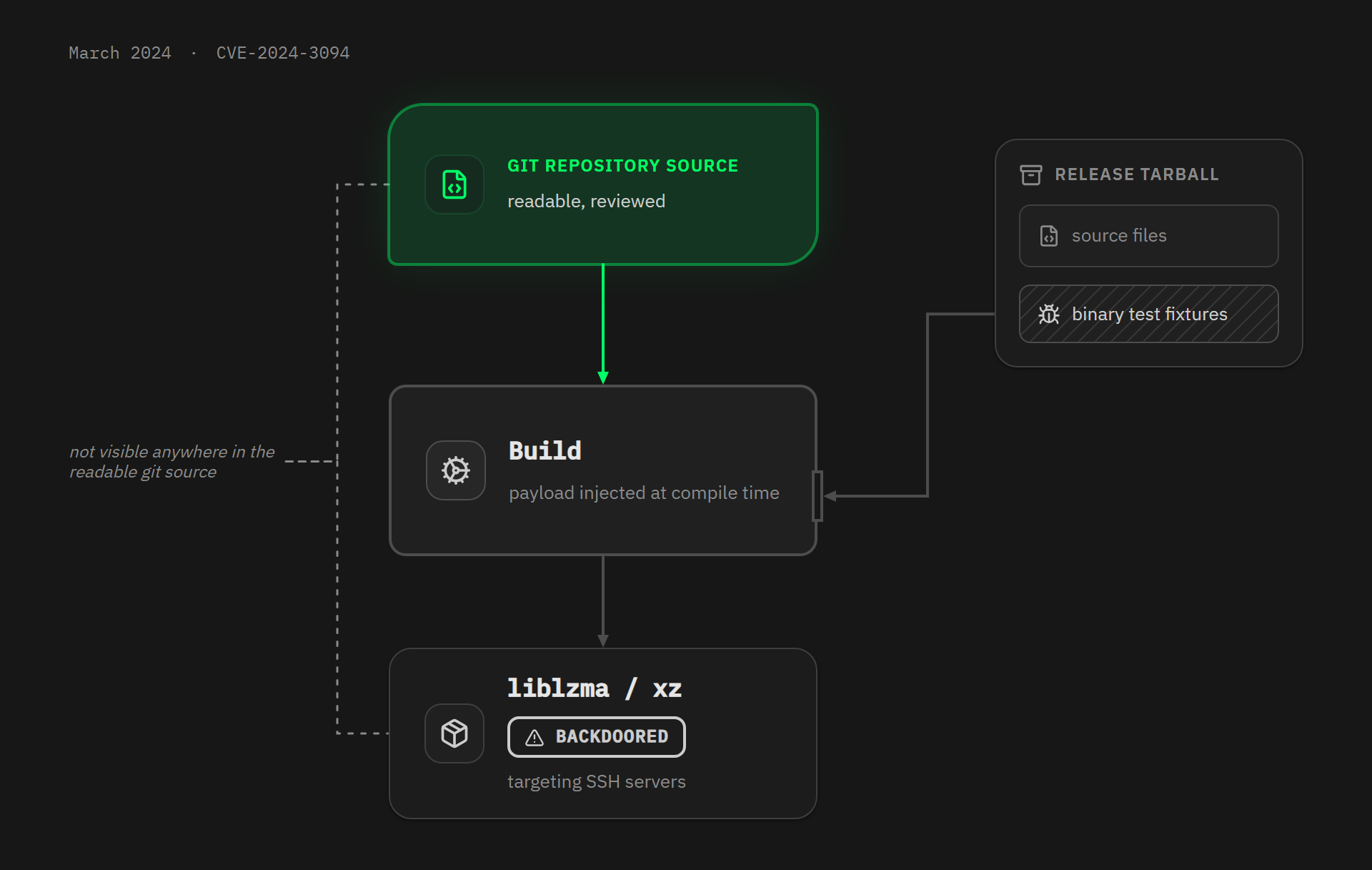
In March 2024, for example, the xz-utils backdoor (CVE-2024-3094) came to light. This very widely used compression library was shipping release archives that contained malicious code, hidden inside binary test files and injected at build time. The target was SSH servers. The script that set the whole thing off existed only in the release archives, so nothing showed up in the readable source code of the repository. A few weeks more and it would have reached the stable versions of several major Linux distributions.
Auditing the source code is therefore necessary, but not sufficient. You also need a way to trust the path that leads from the source code to the binary.
Reproducible builds
As explained above, careful users check the authenticity and integrity of the release they are about to run. The hash (a unique cryptographic fingerprint of the file) guarantees that your copy was not altered along the way, and the developer’s signature guarantees that this fingerprint really was published by them.
Checking both is a strongly recommended practice, but it does not entirely remove the need to trust the developer. All it proves is that you received exactly the binary the developer signed. If their build machine is compromised, or if they turn malicious themselves, they will sign a backdoored binary and your check will still report “Good signature”. A signature authenticates the publisher, but it says nothing about the link between the binary and the source code.
That link is exactly what reproducible builds prove.
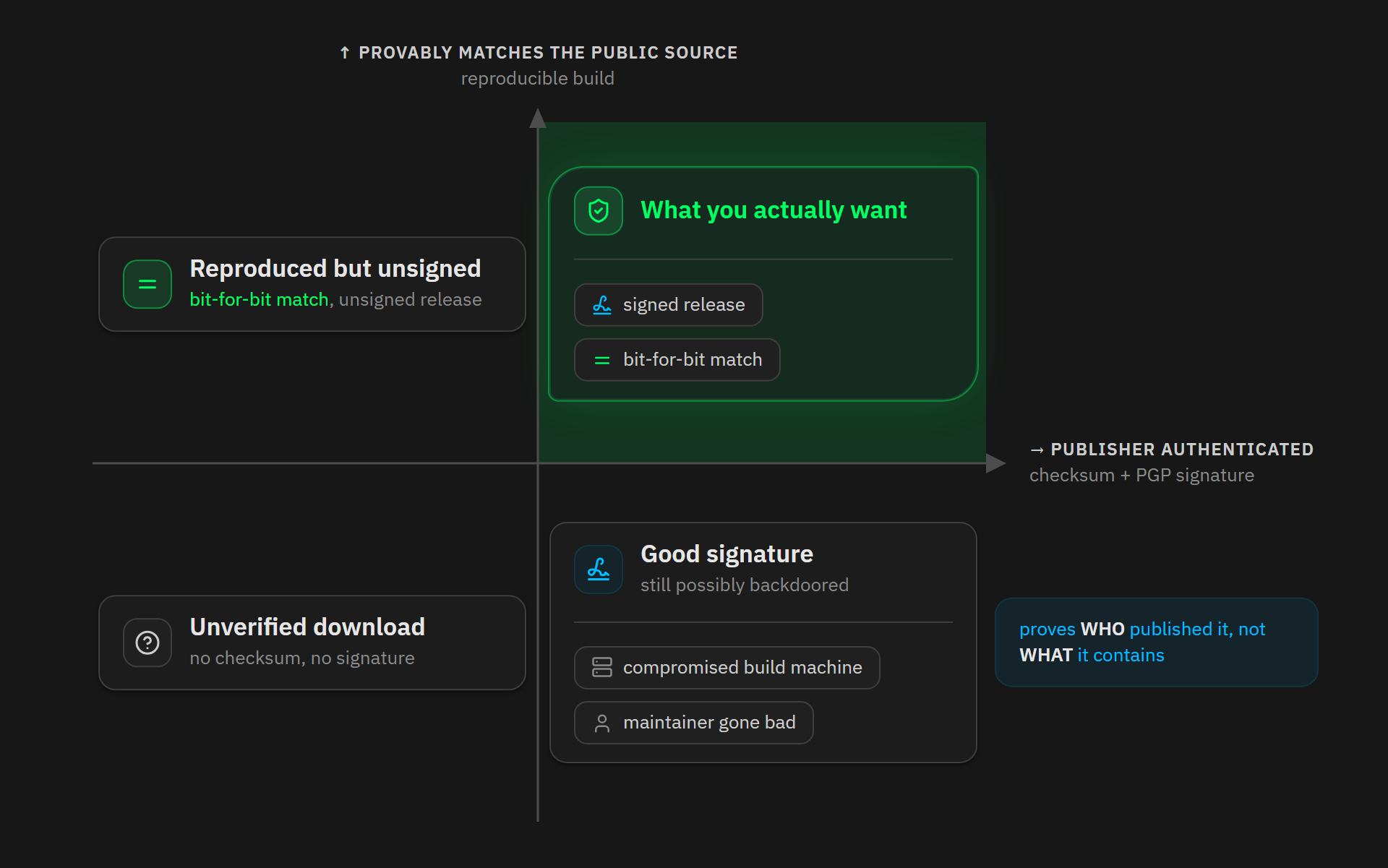
A build is called “reproducible” when, from the same source code, the same environment and the same build instructions, anyone can recreate a bit-for-bit identical copy of the published binaries.
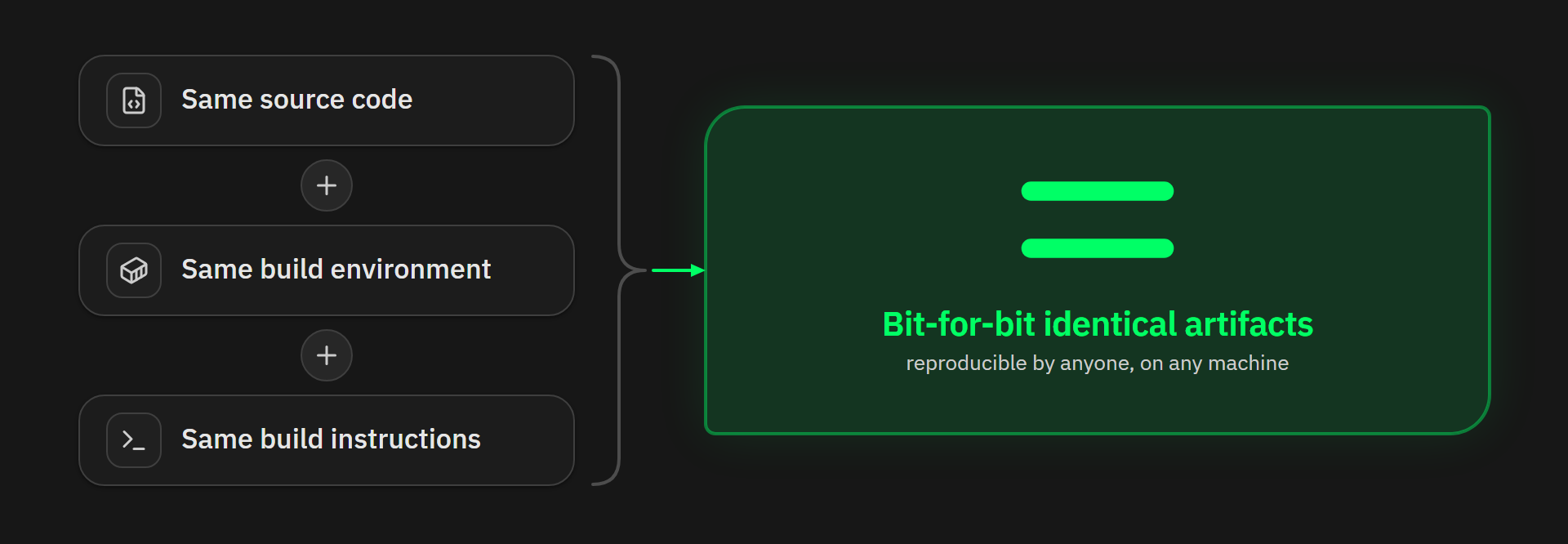
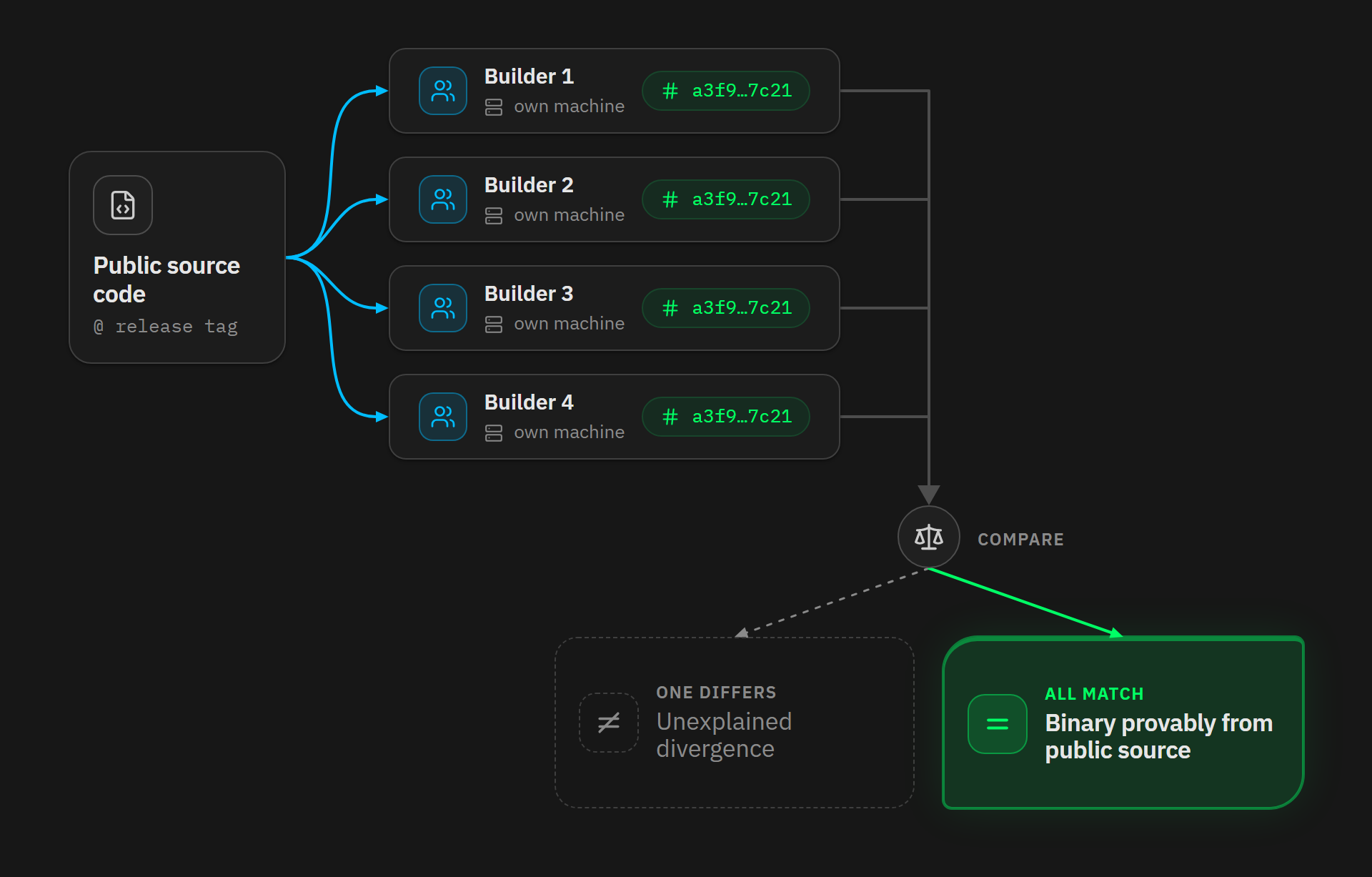
If a build is reproducible, you no longer have to trust the machine or whoever publishes the release. Several independent people can compile the same source code at the same tag on their own machines, then hash the results and compare. If even one fingerprint differs, something is wrong. If they all agree, the binary provably matches the public source code.
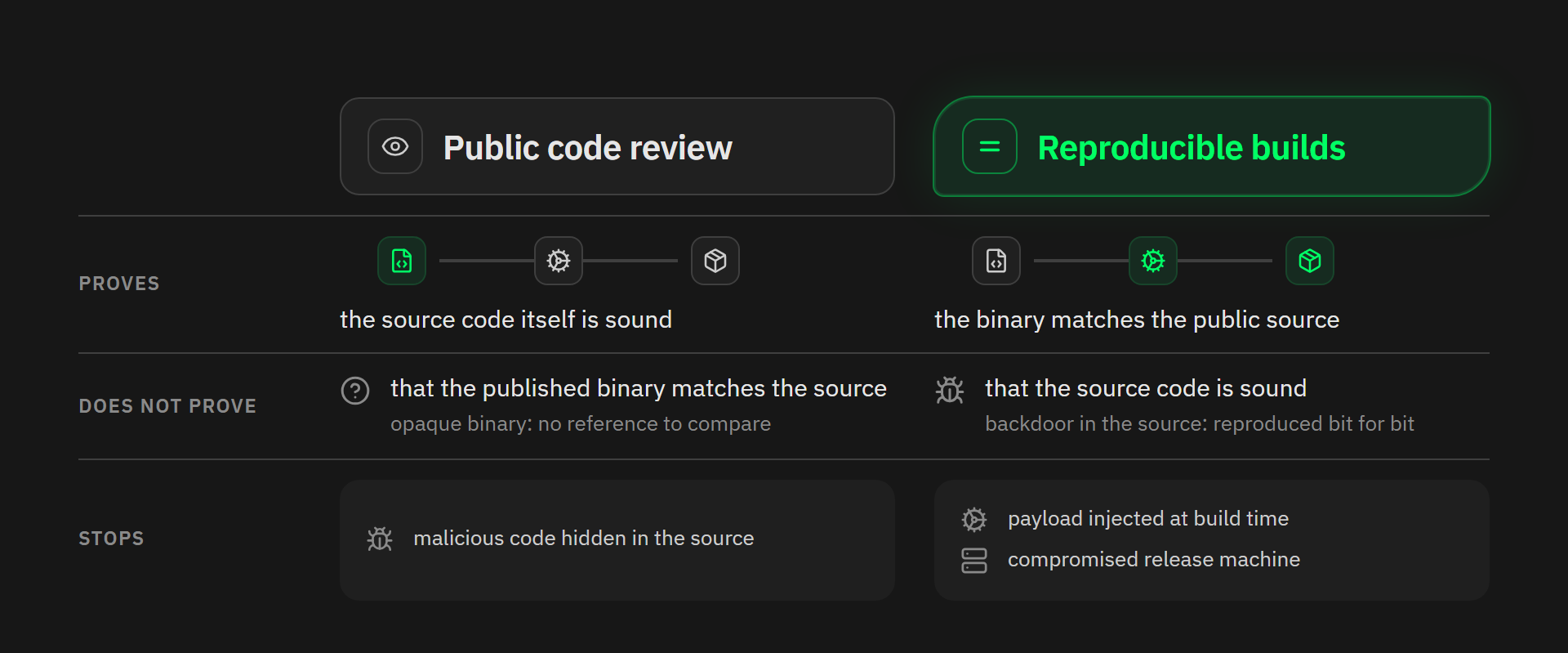
Reproducing the build is still not enough if you want to be 100% sure the software is not malicious. It proves that the binary matches the published source code, not that the source code itself is sound. A backdoor written directly into the code would be reproduced faithfully.
That risk is covered by a different mechanism: public code review. Unless you read every line of the sources yourself, you are still trusting someone, but that trust sits in the best possible place, because hiding malicious code for long is far harder in readable text that is published and reviewed by several contributors than in an opaque binary. Even more so with LLMs review in the mix.
So reproducible builds do not replace code review, they just extend its transparency all the way to the file you run.
Reproducing a build, however, is harder than it looks, because an ordinary build is full of accidental noise: timestamps baked into files, absolute paths that come from the builder’s own machine, or the order in which the filesystem lists files. Reproducible build systems hunt all of it down. They fix a reference date, normalize paths, sort file listings and clear out whatever is left of the environment. The build then becomes deterministic: the same inputs produce the same outputs, whatever the machine.
Delivering those identical inputs is exactly what package managers like Guix and Nix can guarantee.
Guix and Nix
Nix (created by Eelco Dolstra in 2003) and GNU Guix (launched by Ludovic Courtès in 2012, building on Nix’s ideas) are “functional” package managers, in the mathematical sense (a build is treated as a pure function of its declared inputs).
The sources, the compiler, the libraries and the options make up a single explicit set of inputs. The build runs on Linux inside an isolated environment, and the result is stored under a path derived from a cryptographic hash of the full dependency graph that produced it.
Because of that, nothing depends on whatever happens to be installed on your machine. Two people building the same package, pinned to the same revision, get the same environment right down to the compiler.
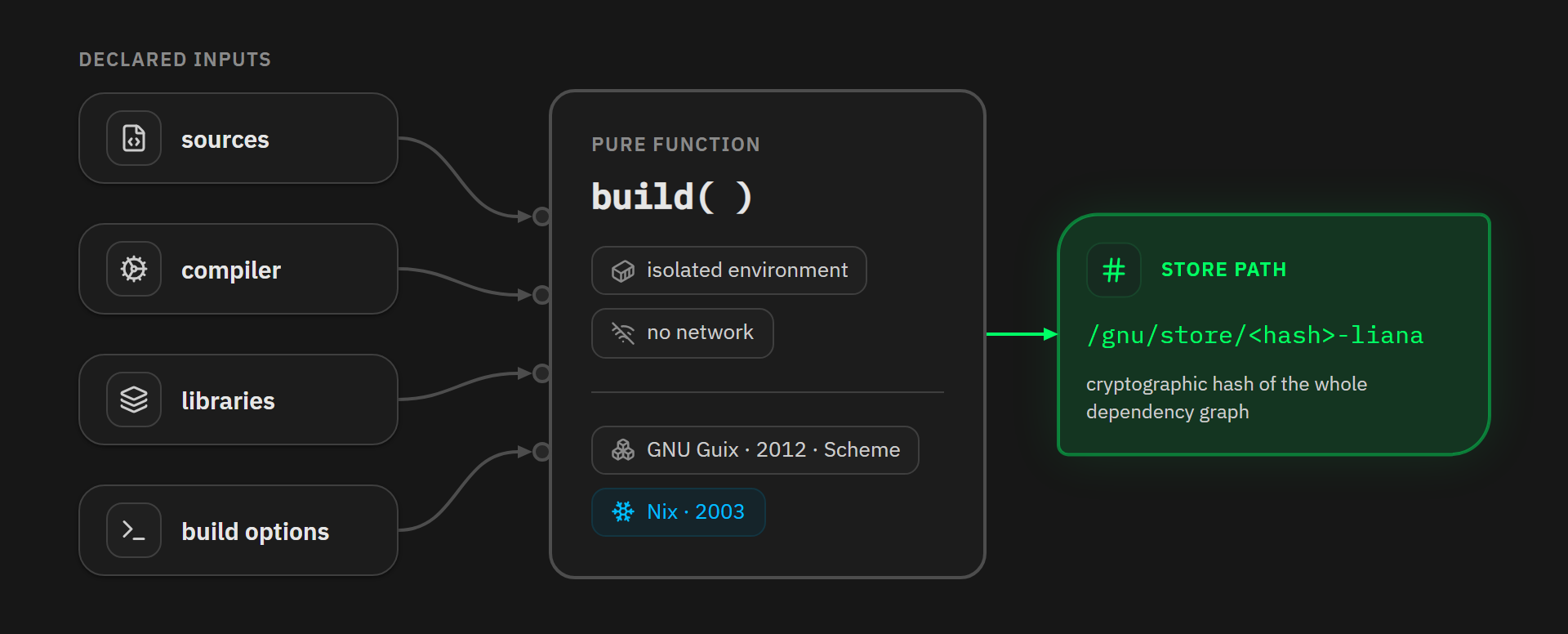
That property is what makes reproducible releases practical: the build produces exactly the same binary whatever machine is used.
Who compiles the compiler?
There is still a hole in this story. Your build environment contains a compiler. That compiler is itself a binary, compiled by an older compiler, and you can keep walking back up the chain. At some point, every system bootstraps from binaries nobody can read. If trust has to stop somewhere, how big is that somewhere?
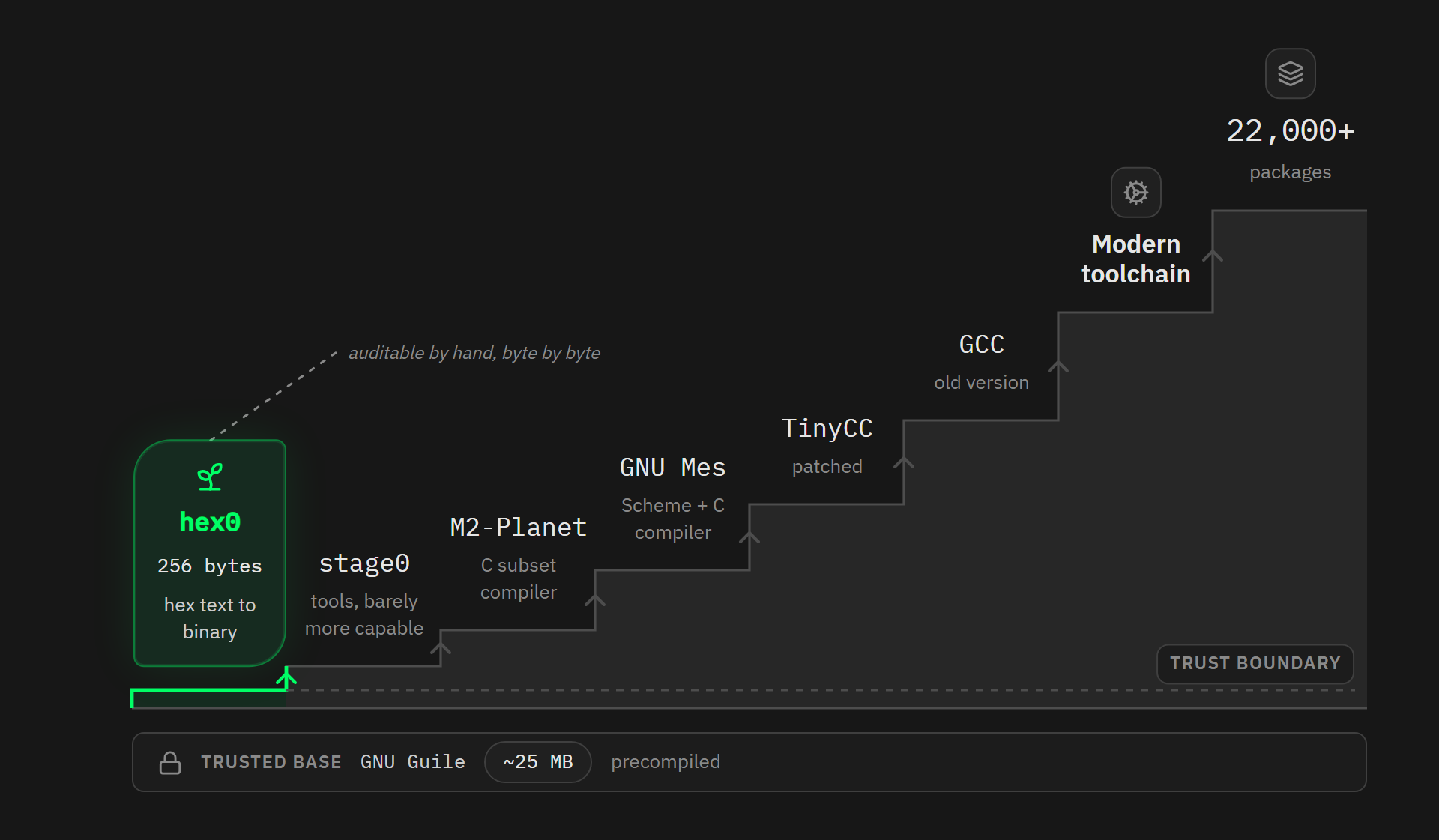
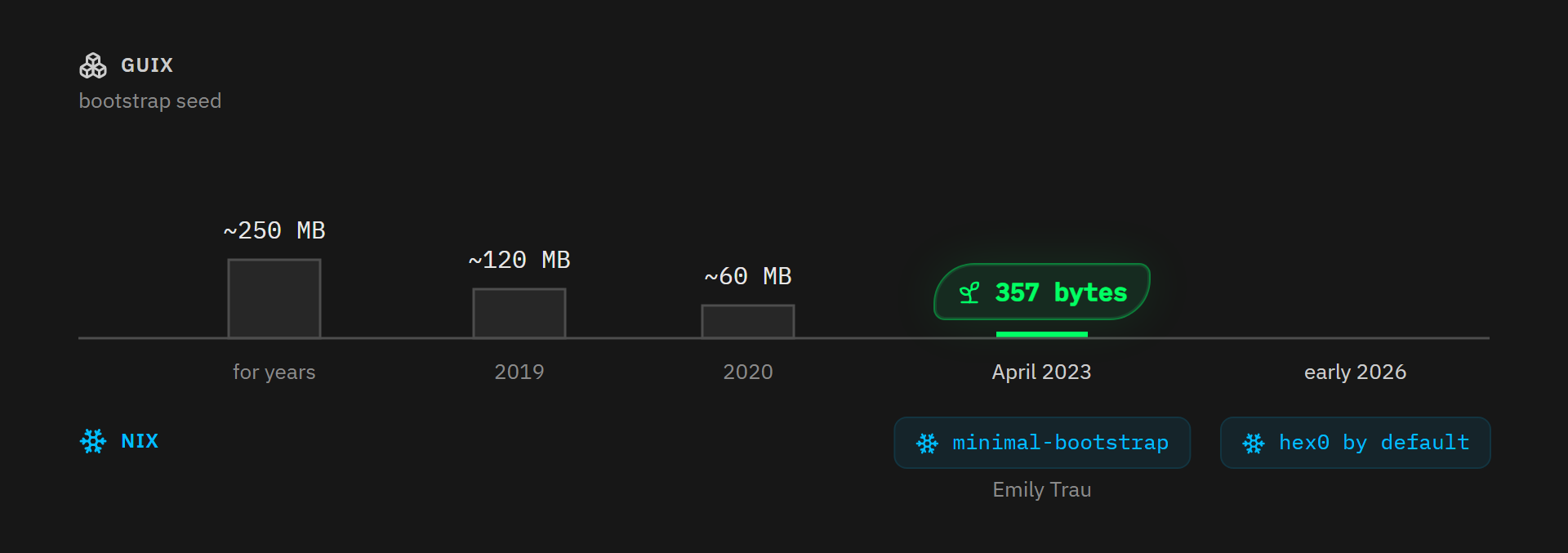
For years, Guix’s answer was: around 250 MB of opaque bootstrap binaries (GCC, glibc, binutils and various tools). Then the Bootstrappable Builds project went after that seed. It fell to around 120 MB in 2019, then around 60 MB in 2020, and in April 2023 Guix announced the Full-Source Bootstrap. It is a graph of more than 22,000 packages rooted in a 357-byte binary seed (256 bytes in the stage0 version Guix pins today), alongside a precompiled Guile interpreter of around 25 MB that drives the process.
The chain works as a cascade. That seed, hex0, does one trivial thing: it converts hexadecimal text into binary, and it is small enough for a human to audit byte by byte. hex0 builds the stage0 tools, which build M2-Planet, a compiler for a subset of the C language. M2-Planet compiles GNU Mes, a small Scheme interpreter that ships with a C compiler. Mes compiles a patched TinyCC, then a standard TinyCC, which compiles an old GCC, passed along through intermediate GCCs up to the modern toolchain, and everything else follows from there.
And Nix has joined the movement. In April 2023, Emily Trau started a minimal-bootstrap package set for nixpkgs, based on the same hex0/stage0 seed lineage and on GNU Mes.
In late January 2026, that bootstrap became the default behavior. On Linux x86_64 and i686, the standard nixpkgs toolchain now starts from the tiny hex0 seed, and the old bootstrap binaries have been removed.
Note: neither of the 2 systems is magically free of trust. Both trust the tool that drives the build (Guix’s daemon, inherited from Nix, and Nix’s evaluator) and a running kernel. Guix adds its roughly 25 MB bootstrap Guile, whose role the project has said it wants to shrink. The goal is not zero trust, but bringing the unauditable part down from hundreds of megabytes to something a person can actually check.
Bitcoin Core: reproducible releases, publicly attested
Bitcoin Core has produced deterministic builds for most of its history, first with Gitian, a system based on virtual machines that still trusted a mountain of Ubuntu binaries. But since version 22.0 (September 2021), the official releases have been built with Guix, precisely to shrink that trusted base. The toolchain is now itself bootstrapped and auditable, thanks to the Guix full-source bootstrap described above.
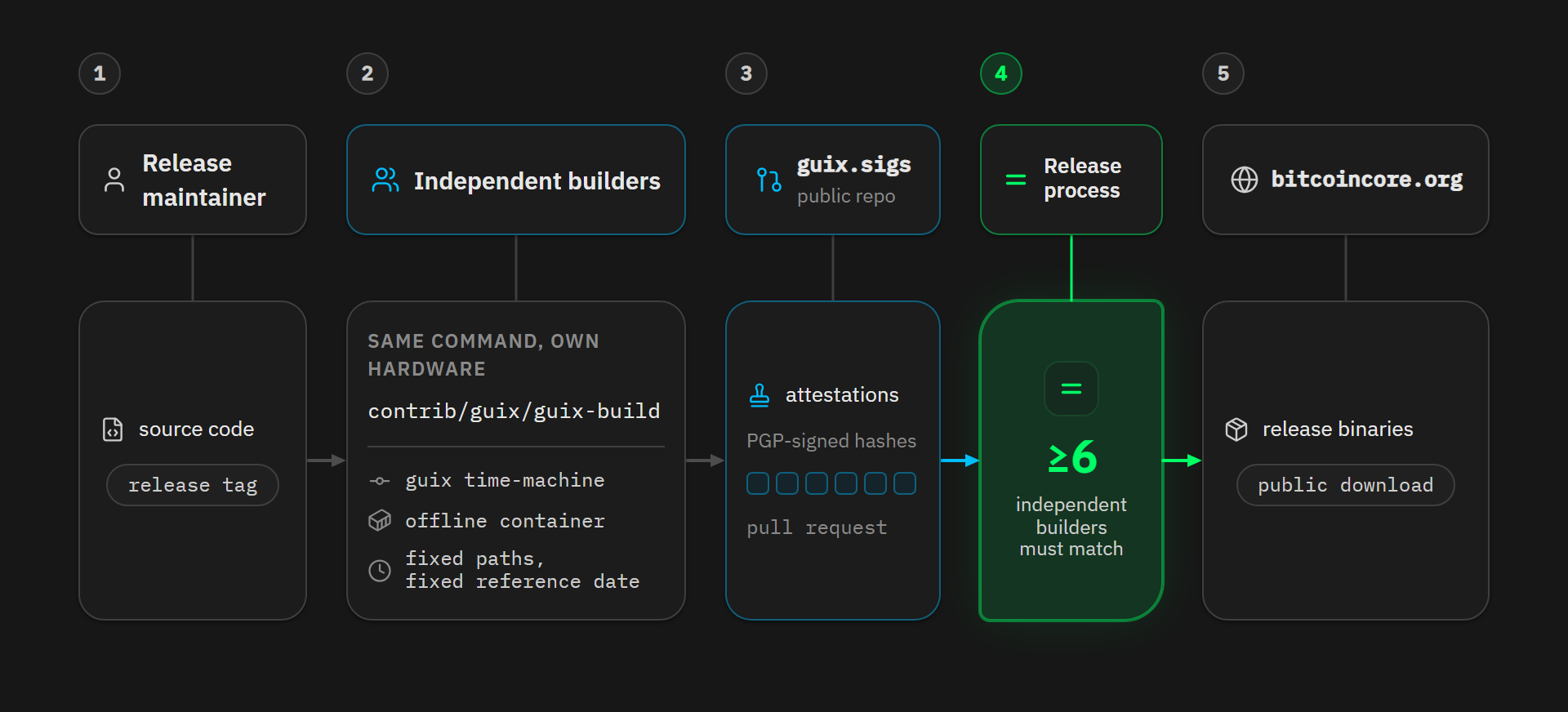
The whole process fits inside the contrib/guix/guix-build command. It pins an exact Guix revision with guix time-machine, then builds inside an offline container, with fixed paths and a fixed reference date, cross-compiling for the 8 release targets.
Independent contributors can therefore run the same command on their own machine, then publish PGP-signed checksum lists as pull requests to the public guix.sigs repository. Bitcoin Core’s release process requires the results of at least 6 independent builders to agree before the binaries are published on bitcoincore.org.
bitcoind-gunix
One objection remained: everyone now reproduces the release inside the same Guix bubble. If Guix itself were compromised, every builder would agree on the same wrong bytes.
That objection has just lost most of its force with bitcoind-gunix, a personal project started in 2022 by the developer 0xB10C, which reimplements Bitcoin Core’s release chain as a Nix flake, rebuilding toolchains and dependencies from the upstream sources, without reusing anything from an existing Guix build.
In May 2026, the project produced its first bitcoind bit-for-bit identical to the official one, but only by patching a few bytes by hand, 4 of which were copied straight from the official binary. Those patches were gone by mid-June, and since July, the project has reproduced the entire v31.1 release for the 8 targets.
This project matters, because the 2 package ecosystems are maintained independently, with toolchains built differently on top of the same seed lineage. In practice, slipping in a backdoor at build time would mean rigging Guix, rigging Nix, and rigging the machine of every builder who attests, making them all produce exactly the same forged bytes.
Liana: reproducible on both stacks, bootstrappable on Guix
Liana follows the same philosophy, and already straddles the 2 systems. For the Linux binaries, Liana uses Guix, following Bitcoin Core’s approach:
- the build script pins an exact Guix commit with
guix time-machine, - it vendors every Rust dependency as pinned by
Cargo.lock, - then builds inside a Guix container with no network access at all.
The Rust compiler used inside the container comes from Guix’s own full-source bootstrap chain, which makes the Linux build not only reproducible, but bootstrappable.
For the Windows and macOS binaries, Liana uses Nix.
Be careful: this does not mean building on Windows or macOS: everything starts from the same Linux machine, which cross-compiles for those 2 platforms.
Nix takes over here because its ecosystem has far more mature tooling than Guix does for cross-compiling Rust to those targets (mingw-w64 for Windows, Apple’s SDK for macOS). The trade-off is that the Rust toolchain used is the official binary release, pinned by hash in the flake, with frozen options and timestamps. The result is therefore reproducible, but not bootstrappable the way the Linux side is.
Note: one category of artifacts can never be compared byte by byte: the ones signed for distribution. The Windows
.execarries an Authenticode signature, and the macOS application is signed with a Developer ID certificate then notarized by Apple, and those signatures are produced with private keys that you, as a user of the software, thankfully do not have. That is why every Liana release also shipsnoncodesignedtwins of these files: those, along with the Linux and macOS archives and the Debian package, are the reproducible targets.
Every release comes with a liana-<version>-shasums.txt file covering all the artifacts, signed with Edouard’s PGP key (5B63F3B97699C7EEF3B040B19B7F629A53E77B83). The git tags and the merge commits are signed too.
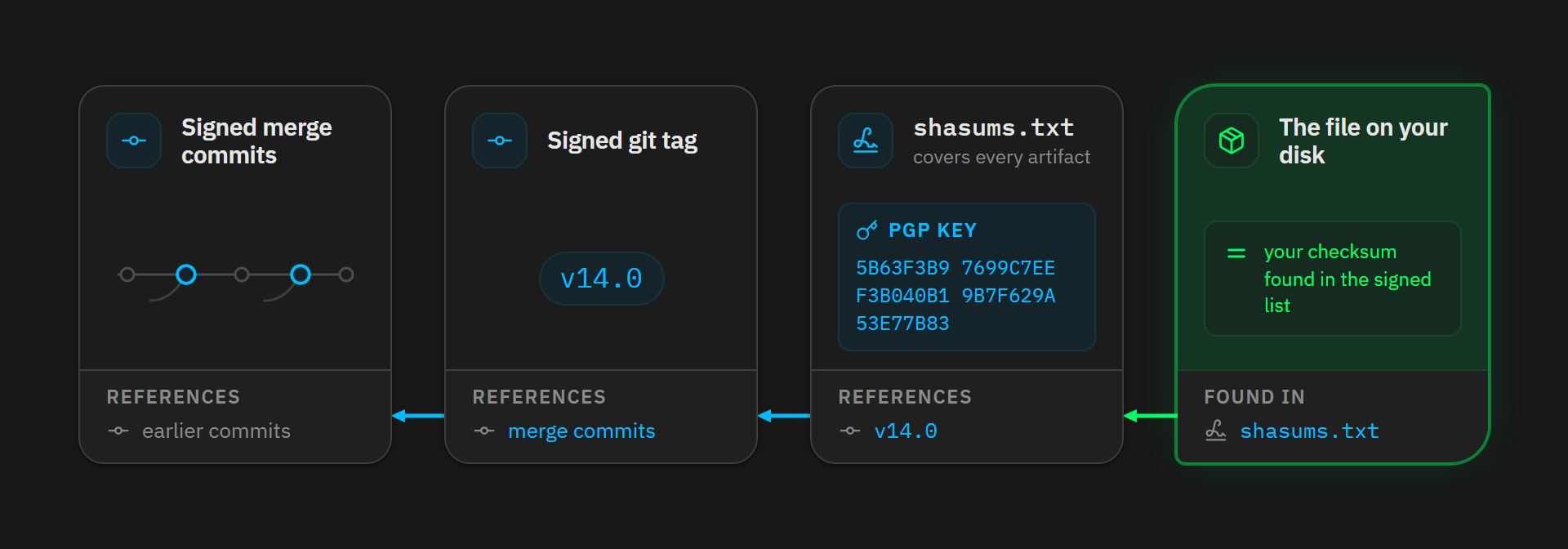
How do you verify and reproduce the Bitcoin Core and Liana builds?
So there are 2 levels of “Don’t Trust Verify”:
- checking the fingerprints and signatures (it takes 2 minutes, and everyone should do it: you prove that your file really is the official release),
- and actually reproducing the build (hours of work and a lot of disk space, but you also prove that this release matches the source code, without trusting whoever publishes it).
Guix and the release tooling both assume a Linux build machine. On macOS there is no native Guix: use a Linux virtual machine. On Windows, both can run inside WSL2.
But checking fingerprints and signatures works natively everywhere.
1. Verify a Liana release (all platforms)
Head to the releases page and download the binary for your platform into a single folder, along with the liana-14.0-shasums.txt and liana-14.0-shasums.txt.asc files. In all the Liana commands below, I use version 14.0, the one I rebuilt for this article. If you download a newer release, replace 14.0 with its version number.
Then open a terminal in that folder.
On Linux
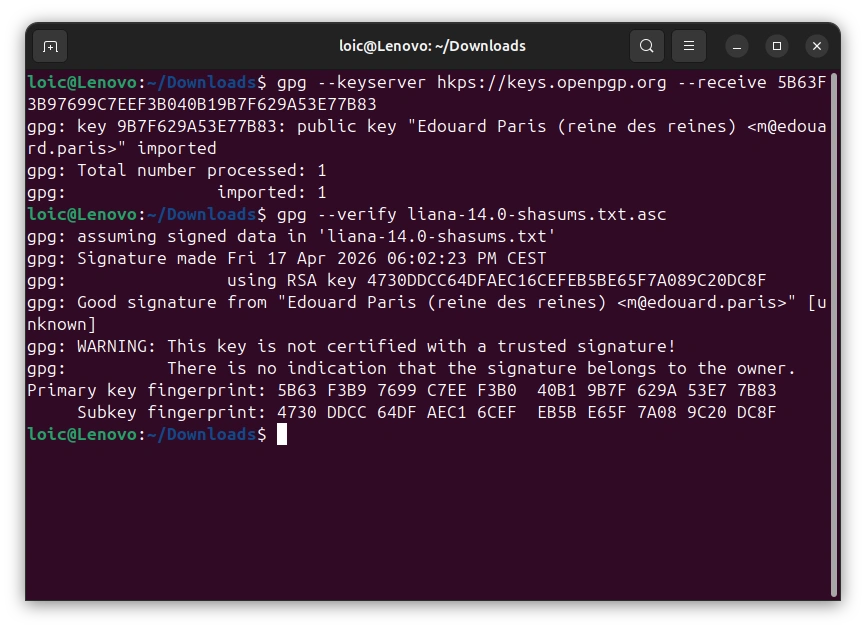
GnuPG comes preinstalled on most distributions. Import Edouard’s public key, then verify the signature on the checksum list:
gpg --keyserver hkps://keys.openpgp.org --receive 5B63F3B97699C7EEF3B040B19B7F629A53E77B83
gpg --verify liana-14.0-shasums.txt.asc
The output should read “Good signature”, with the key fingerprint shown above.
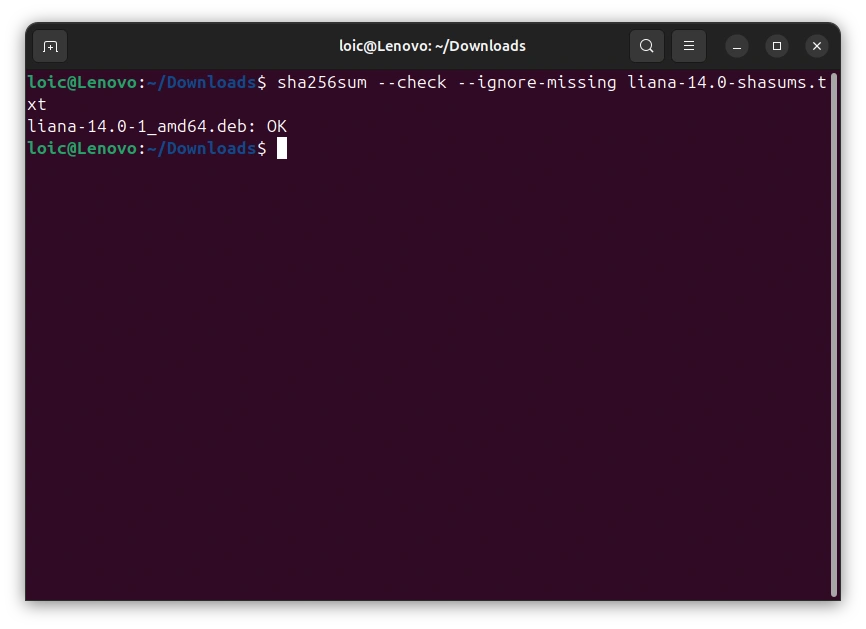
Then check the file you downloaded:
sha256sum --check --ignore-missing liana-14.0-shasums.txt
An “OK” should appear next to the name of your file.
On macOS
First install GnuPG, for example with Homebrew:
brew install gnupg
The commands are then the same as on Linux, except for the hash check:
gpg --keyserver hkps://keys.openpgp.org --receive 5B63F3B97699C7EEF3B040B19B7F629A53E77B83
gpg --verify liana-14.0-shasums.txt.asc
shasum -a 256 --check --ignore-missing liana-14.0-shasums.txt
You are looking for the same results: “Good signature”, then “OK”.
On Windows
Install Gpg4win, which provides the gpg command in PowerShell. Import the key and verify the signature:
gpg --keyserver hkps://keys.openpgp.org --receive 5B63F3B97699C7EEF3B040B19B7F629A53E77B83
gpg --verify liana-14.0-shasums.txt.asc
Windows has no sha256sum, but PowerShell can compute your file’s fingerprint and look it up in the signed list:
Select-String (Get-FileHash .\liana-14.0.exe).Hash.ToLower() .\liana-14.0-shasums.txt
If the command prints the line matching your file, the fingerprint matches. If it prints nothing, do not run the binary.
The same pattern applies to Bitcoin Core with its SHA256SUMS and SHA256SUMS.asc files published on bitcoincore.org, once you have imported the builders’ keys.
This step lets you verify that your file really is the published, signed release, in other words that it is authentic and has not been altered. To verify that it matches the source code, though, you have to rebuild it yourself.
2. Reproduce Liana (Linux)
Before installing Guix, get the machine ready with 2 tools.
The Guix installation script checks for a handful of system tools at startup, and one of them is missing if you are on Ubuntu: newgidmap, provided by the uidmap package.
Liana’s build script needs cargo on the host machine, which you can install with rustup:
sudo apt install uidmap
curl --proto '=https' --tlsv1.2 -sSf https://sh.rustup.rs | sh
Now install Guix.
Debian removed it from its repositories in September 2025, and Ubuntu did the same from 25.10 (24.04 LTS only keeps an old guix 1.4.0 from 2022), so you have to use the official installation script. Download it, then run it:
wget https://guix.gnu.org/guix-install.sh
chmod +x guix-install.sh && sudo ./guix-install.sh
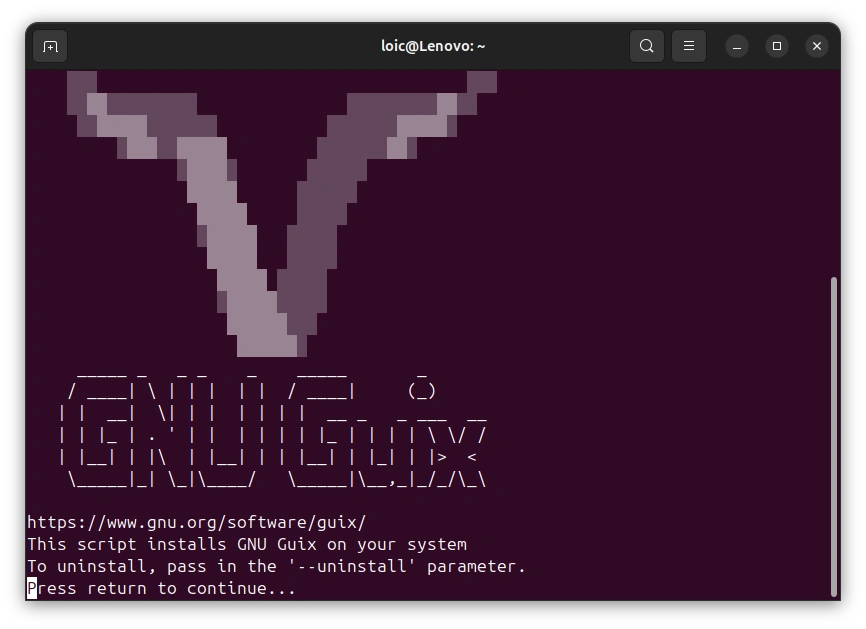
Log out of your session, then log back in. Check that everything is in place:
guix --version
cargo --version
Next, fetch Liana’s source code at the release tag, and verify the tag’s signature along the way: it is made with the same key as the shasums (if you skipped step 1, import Edouard’s key first, as shown above):
git clone https://github.com/wizardsardine/liana && cd liana
git checkout v14.0
git verify-tag v14.0
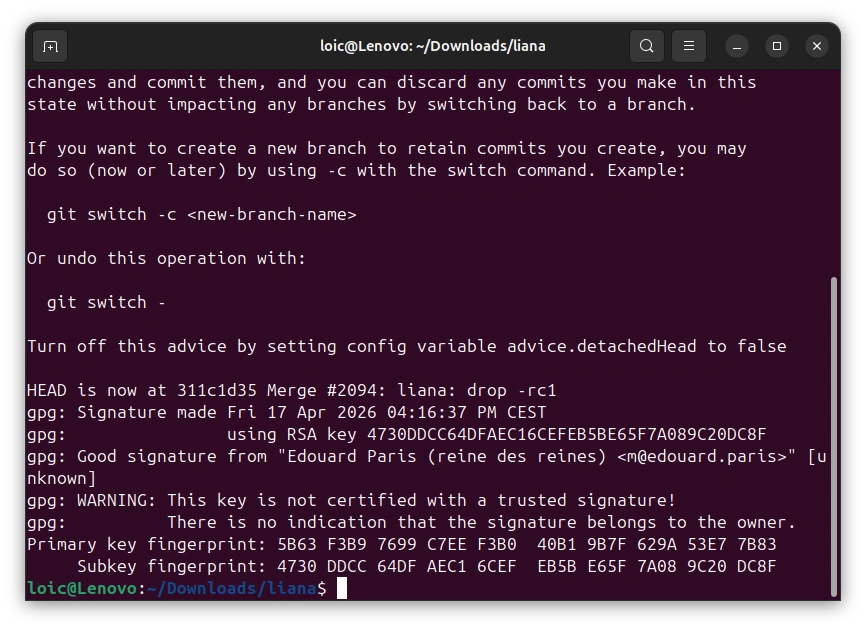
Start the reproducible build. Everything runs inside a pinned offline Guix container. The first run is long, while Guix sets up the toolchain:
BUILD_ROOT=$PWD/guix-build ./contrib/reproducible/guix/guix-build.sh
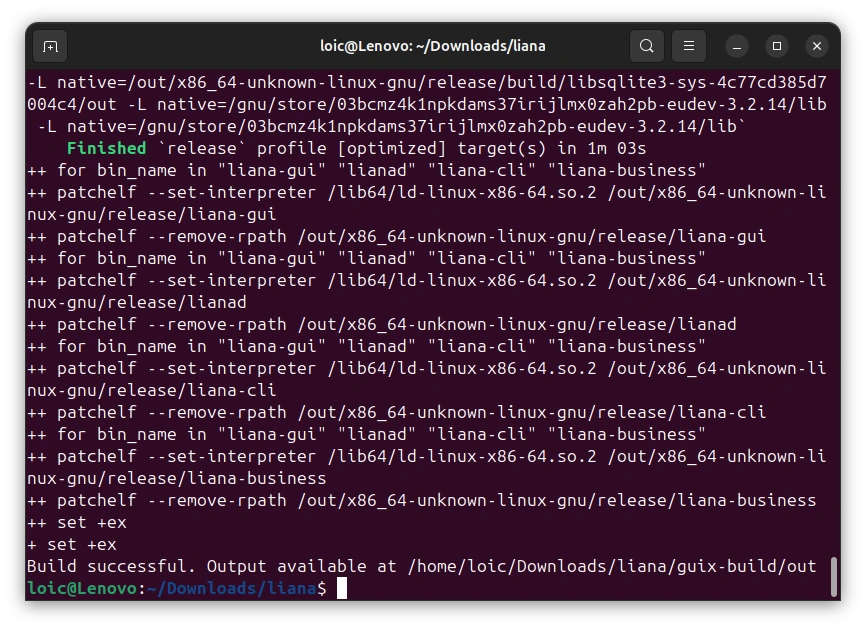
Download the official Linux archive for the release, then extract it:
wget https://github.com/wizardsardine/liana/releases/download/v14.0/liana-14.0-x86_64-linux-gnu.tar.gz
tar -xzf liana-14.0-x86_64-linux-gnu.tar.gz
Finally, compare your binaries with the official ones:
for b in lianad liana-cli liana-gui; do
  sha256sum guix-build/out/x86_64-unknown-linux-gnu/release/$b liana-14.0-x86_64-linux-gnu/$b
done
The fingerprints come out in pairs. In each pair, yours and the one from the official release must be identical.
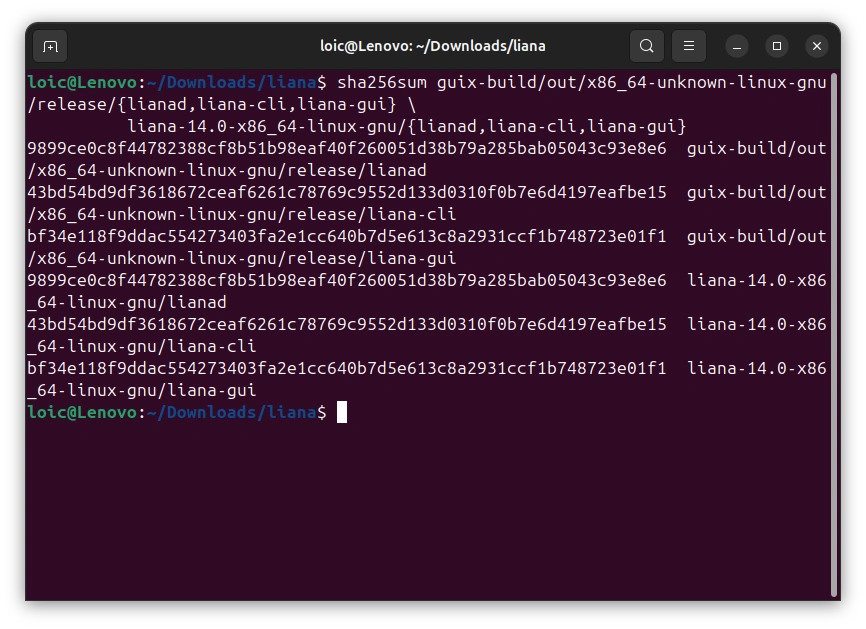
The Windows and macOS artifacts are rebuilt on the same Linux machine with Nix (once it is installed, run nix build .#liana.x86_64-pc-windows-gnu; the Apple targets build the same way once you have supplied the Xcode SDK).
For more detail, see contrib/reproducible.
3. Reproduce Bitcoin Core (Linux)
With Guix installed as above, fetch Bitcoin Core’s source code at the release tag:
git clone https://github.com/bitcoin/bitcoin.git && cd bitcoin
git checkout v31.1
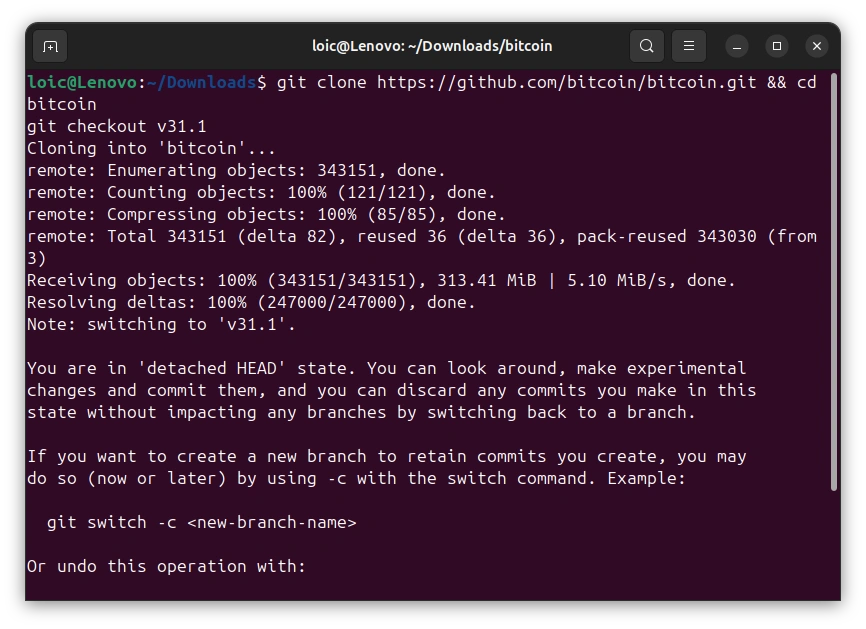
Start the build, limiting it to a single target. Budget around 24 GB of free disk space (16 GB for /gnu/store, 8 GB per target), and several hours the first time:
env HOSTS='x86_64-linux-gnu' ./contrib/guix/guix-build
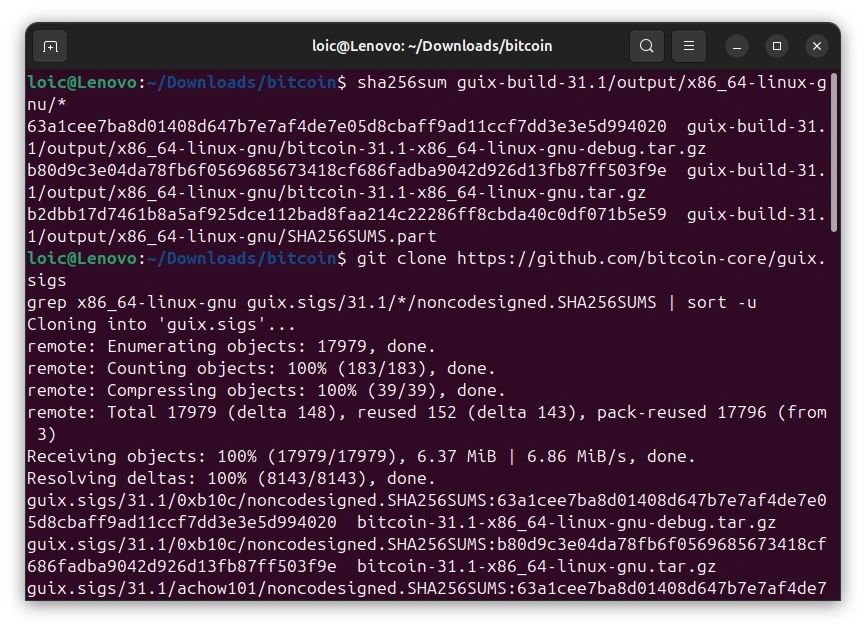
Compute the fingerprints of the binaries you have just produced:
sha256sum guix-build-31.1/output/x86_64-linux-gnu/*
And compare them with the other builders’ public attestations:
git clone https://github.com/bitcoin-core/guix.sigs
grep -h x86_64-linux-gnu guix.sigs/31.1/*/noncodesigned.SHA256SUMS | sort -u
If the output shows only one line per file and your fingerprints are among them, every builder agrees with you: you have just proved independently that the published binaries do come from the public source code.
Drop the
HOSTSvariable and you build all 8 targets (budget around 80 GB of disk, and the macOS targets also require extracting an Xcode SDK).